Stockout rules
Stockout rules have stricter operational requirements than other rule types. Use this guide to keep stockout updates correct and efficient.
Stockout requirements
- Create only one stockout rule per store.
- Update the existing stockout rule instead of deleting and recreating it.
- Delete the stockout rule only when no products are stocked out for that store.
- Batch product changes and update once, instead of one update per product.
Do not create multiple stockout rules for the same store since this can have adverse effect on the user experience.
When a product is considered out of stock
A product is considered out of stock in either of these cases:
- The product is explicitly marked as stocked out.
- A mandatory configuration cannot be fulfilled because all required options are unavailable due to stockout.
Examples:
- A combo meal is out of stock when its required burger is stocked out.
- A combo meal is out of stock when all available options for the required soda choice are stocked out.
Recommended workflow
- Build a full list of currently stocked out products for one store.
- Read the existing stockout rule for that store.
- If no rule exists and the list is non-empty, create one rule.
- If a rule exists and the list changes, update that same rule.
- If the list is empty, delete the existing rule.
This approach avoids unnecessary create/delete cycles and reduces event volume from repeated updates.
Example in the user interface
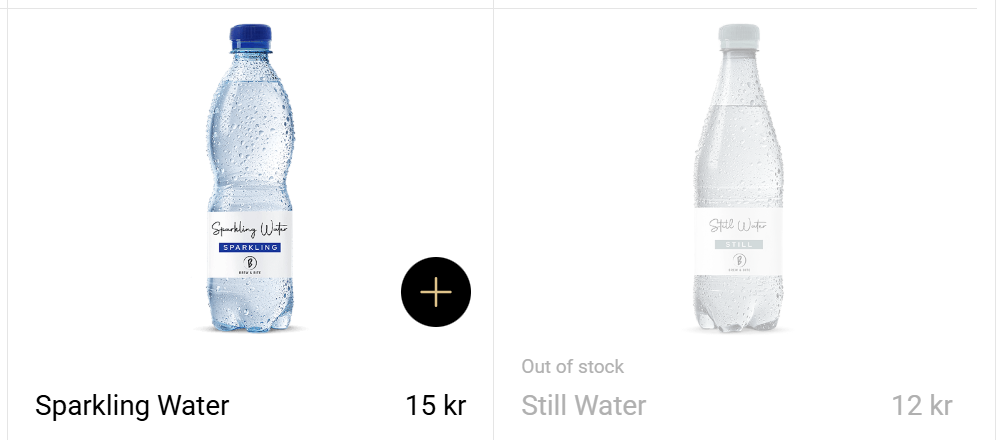
The image below shows a stocked out product next to a non-stocked out product. Use this as a visual reference when validating that your stockout rule changes are reflected correctly in the client experience.
Samples
The examples below show one store per rule and batched product IDs.
Create a stockout rule for one store
Use this when the store has no existing stockout rule and at least one product is stocked out.
{
	"comment": "Stockout for store 222",
	"filter": {
		"products": {
			"appliesTo": "specific",
			"values": [12345, 67890, 13579]
		},
		"stores": {
			"appliesTo": "specific",
			"values": ["222"]
		},
		"storeCountryIsoCodes": {
			"appliesTo": "all"
		},
		"orderClasses": {
			"appliesTo": "all"
		},
		"daysOfWeek": {
			"appliesTo": "all"
		}
	},
	"activeDuring": {
		"timeOfDay": {
			"applies": "always"
		},
		"dates": {
			"applies": "always"
		}
	},
	"type": "Stockout",
	"executionIndex": 75
}
Update the existing stockout rule in one batch
Use this when product availability changes. Send the full, updated list once.
{
	"comment": "Stockout for store 222",
	"filter": {
		"products": {
			"appliesTo": "specific",
			"values": [67890, 24680, 97531]
		},
		"stores": {
			"appliesTo": "specific",
			"values": ["222"]
		},
		"storeCountryIsoCodes": {
			"appliesTo": "all"
		},
		"orderClasses": {
			"appliesTo": "all"
		},
		"daysOfWeek": {
			"appliesTo": "all"
		}
	},
	"activeDuring": {
		"timeOfDay": {
			"applies": "always"
		},
		"dates": {
			"applies": "always"
		}
	},
	"type": "Stockout",
	"executionIndex": 75
}
Delete only when no products are stocked out
When the store has no stocked out products left, delete the rule:
DELETE /rules/<STOCKOUT_RULE_ID>
If at least one product remains stocked out, update the existing rule instead of deleting it.